What You Need Before You Start
Have a scene idea, an account, and an available credit balance. A reference file is optional: you can generate AI audio from a text prompt alone. Start with a small, understandable scene so you can recognize what the result gets right and what needs another pass.
- Keep a few exact spoken lines ready if your scene includes dialogue.
- Decide whether you want speech, sound effects, music, ambience, or a combination.
- Use the tool’s defaults for your first attempt; you can adjust them after listening.
Open the Generator and Sign In
Start in the live audio workspace on the homepage. You can read the controls before signing in, but you need an account to submit a generation request. Keep this guide open in another tab if you want to follow along.
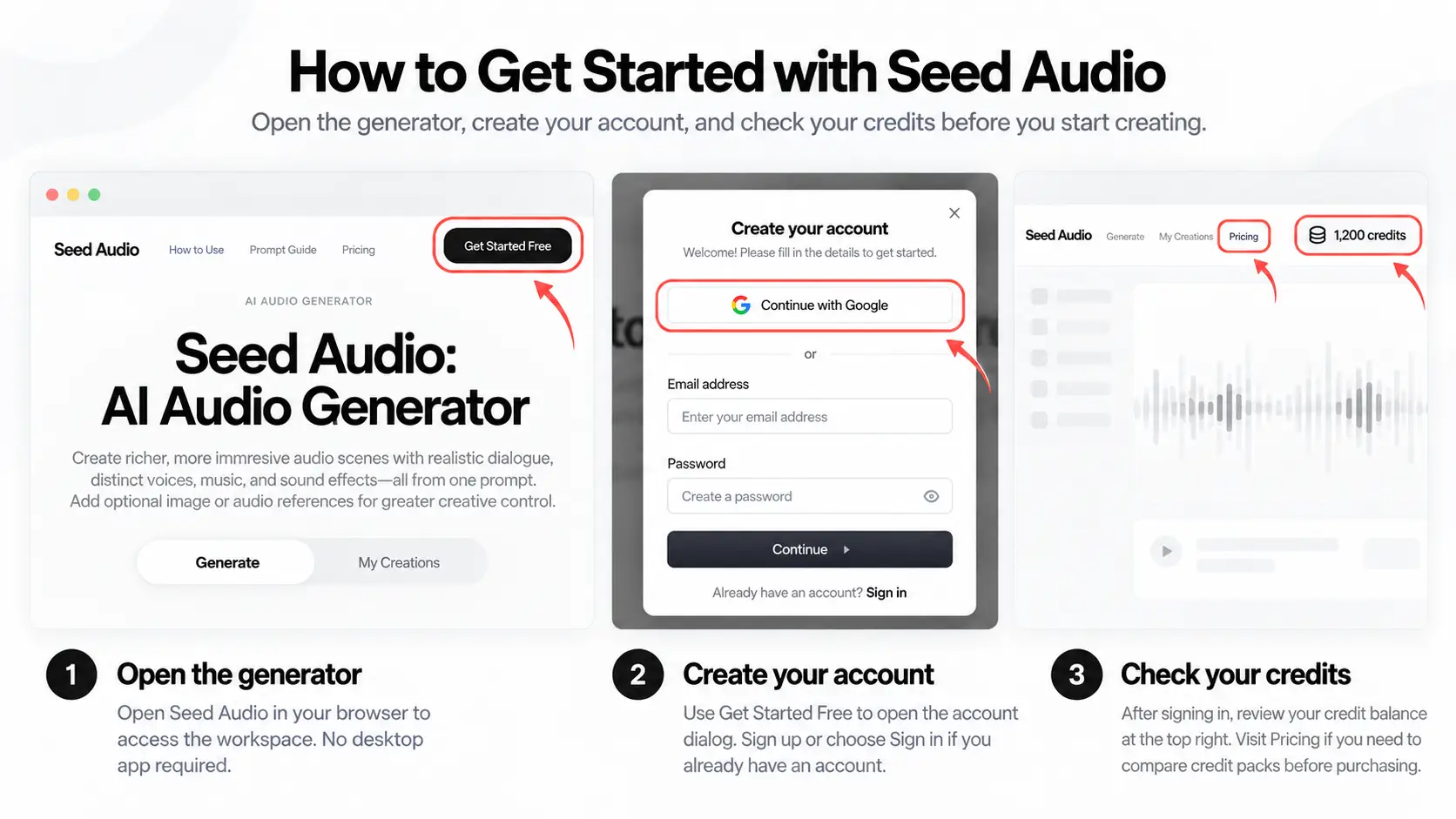
- Select Open audio generator below to jump directly to the workspace. You do not need to install a desktop app.
- Use Get Started Free in the navigation to open the account dialog. Create an account or use the sign-in option if you already have one.
- After signing in, check the credit balance at the top right. Open the pricing page if you need to review credit packs before purchasing.
The workspace displays a usage rate of 5 credits per minute and supports up to 2 minutes per generation. Review the current pricing information before generating so you know which credit pack fits your intended usage.
Choose Your AI Audio Model
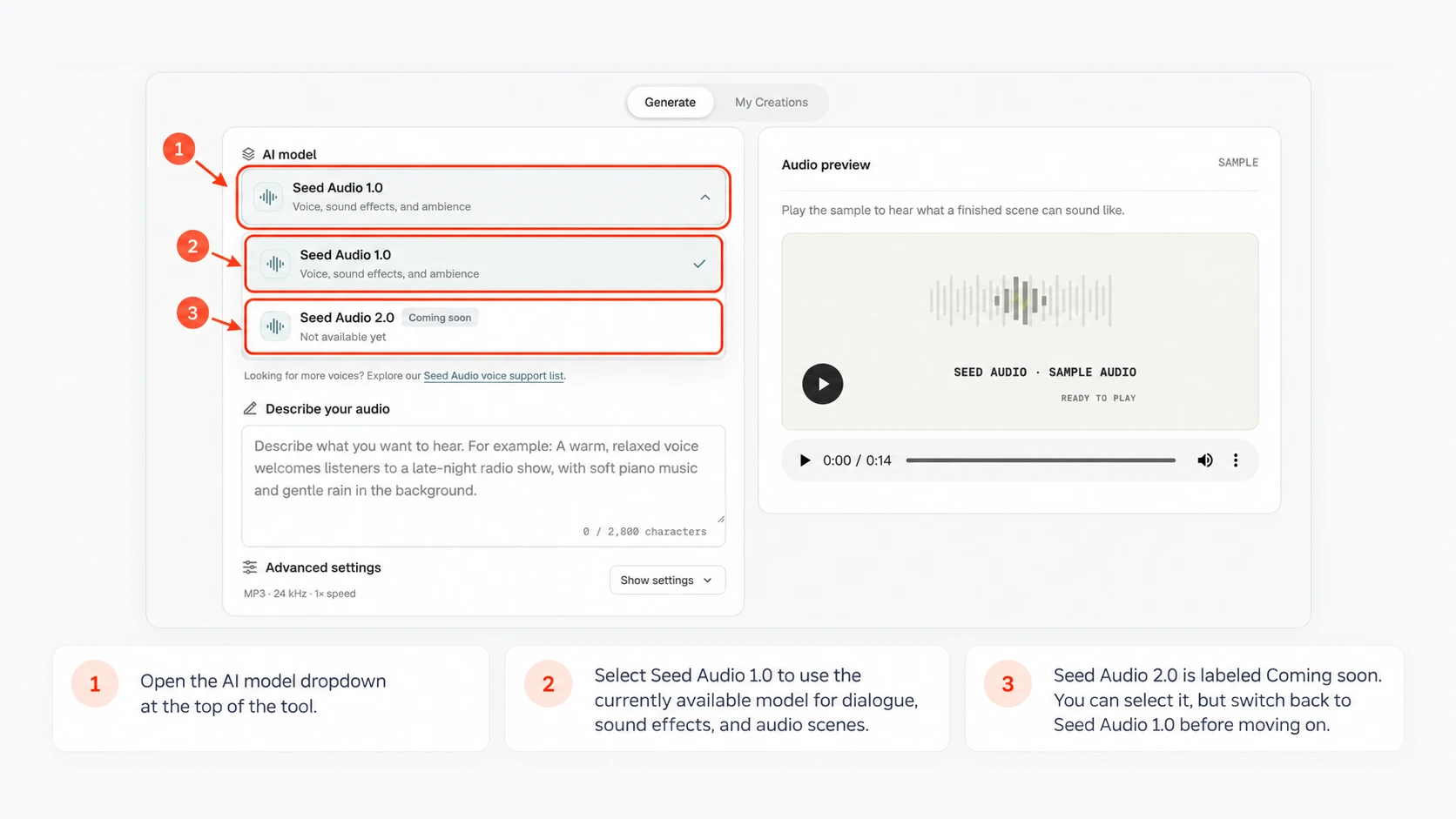
Find AI model at the top of the workspace. Seed Audio 1.0 is ready to use now, and Seed Audio 2.0 is coming soon. Open the dropdown to explore the model options, then choose Seed Audio 1.0 to start creating.
- Open the AI model dropdown at the top of the tool.
- Select Seed Audio 1.0 to generate dialogue, sound effects, and audio scenes with the currently available model.
- Seed Audio 2.0 is labeled Coming soon. You can select it, but Generate audio stays disabled until you switch back to Seed Audio 1.0.
Seed Audio 2.0 is coming soon. In the meantime, bring your ideas to life with Seed Audio 1.0: choose a voice or reference, describe your scene, and generate your audio.
Choose Prompt Only, a Voice, or a Reference
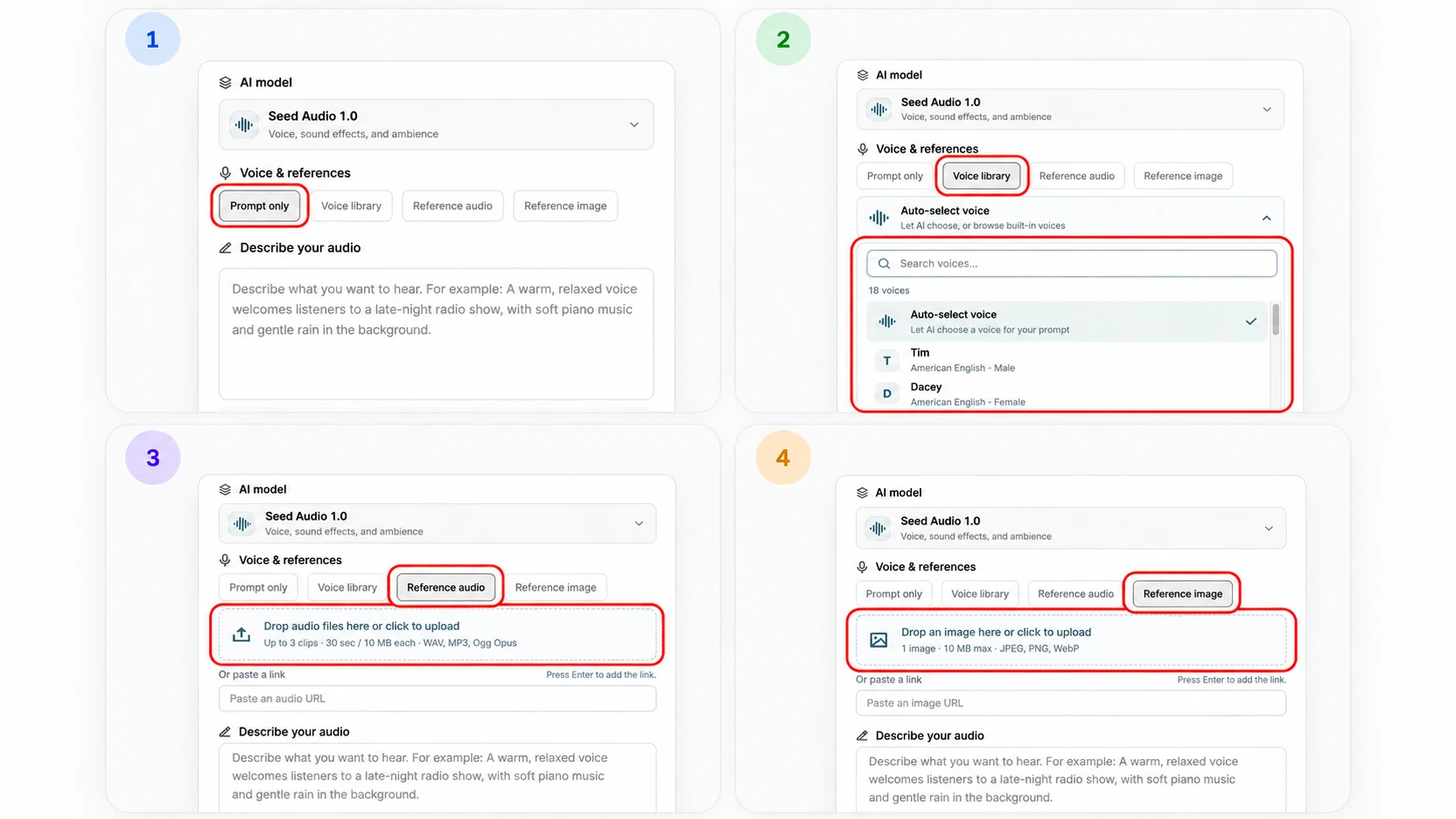
Under Voice & references, choose one of four modes. For a first text-to-audio test, select Prompt only. It lets you hear how your written scene performs without introducing a selected voice or uploaded reference.
- Choose Prompt only to generate audio from your description without sending a voice selection, audio reference, or image reference.
- Choose Voice library to browse built-in voices. Search by name, accent, or gender, then select a voice. Auto-select voice lets the model choose instead. The full voice library also has Use this voice links that open the generator with a voice selected.
- Choose Reference audio to click or drag files into the upload box. Wait for uploading to finish, then listen to the reference player below the link field. Remove a clip with its remove control if necessary.
- Choose Reference image to click or drag one image into the upload box. The uploaded image appears inside that box. Click it or drop another file there to replace it.
| Reference type | Limits | Supported formats |
|---|---|---|
| Audio | Up to 3 clips; each ≤30 seconds and ≤10 MB | WAV, MP3, Ogg Opus |
| Image | 1 image, ≤10 MB | JPEG, PNG, WebP |
The modes are mutually exclusive. A saved voice or reference may still be there when you switch back, but only the current mode is sent when you generate. Use reference material you have permission to upload.
Write Your Audio Scene Prompt
In Describe your audio, explain what the listener should hear. The input supports up to 2,800 characters, with a counter in the lower-right corner. Start with one clear situation rather than a long list of unrelated sounds.
- Describe the setting and the main sound: a host speaking in a quiet studio, two travelers on a platform, or rain falling beside a stream.
- For speech, name each speaker and include the exact words in quotation marks. Specify the language, emotion, and delivery in plain English, such as a calm voice at a conversational pace.
- Add ambience, music, and sound effects only when they help the scene. Describe which sound should stay in the foreground and what should remain quiet behind it.
- Put events in listening order. Say whether a sound happens before, during, or after a line. If you selected a reference, explain the voice quality or scene mood it should guide.
You do not need to specify a duration. Let the dialogue and sound events determine the length. If you do request a duration, treat it as creative direction rather than an exact editing boundary.
Review Optional Audio Settings
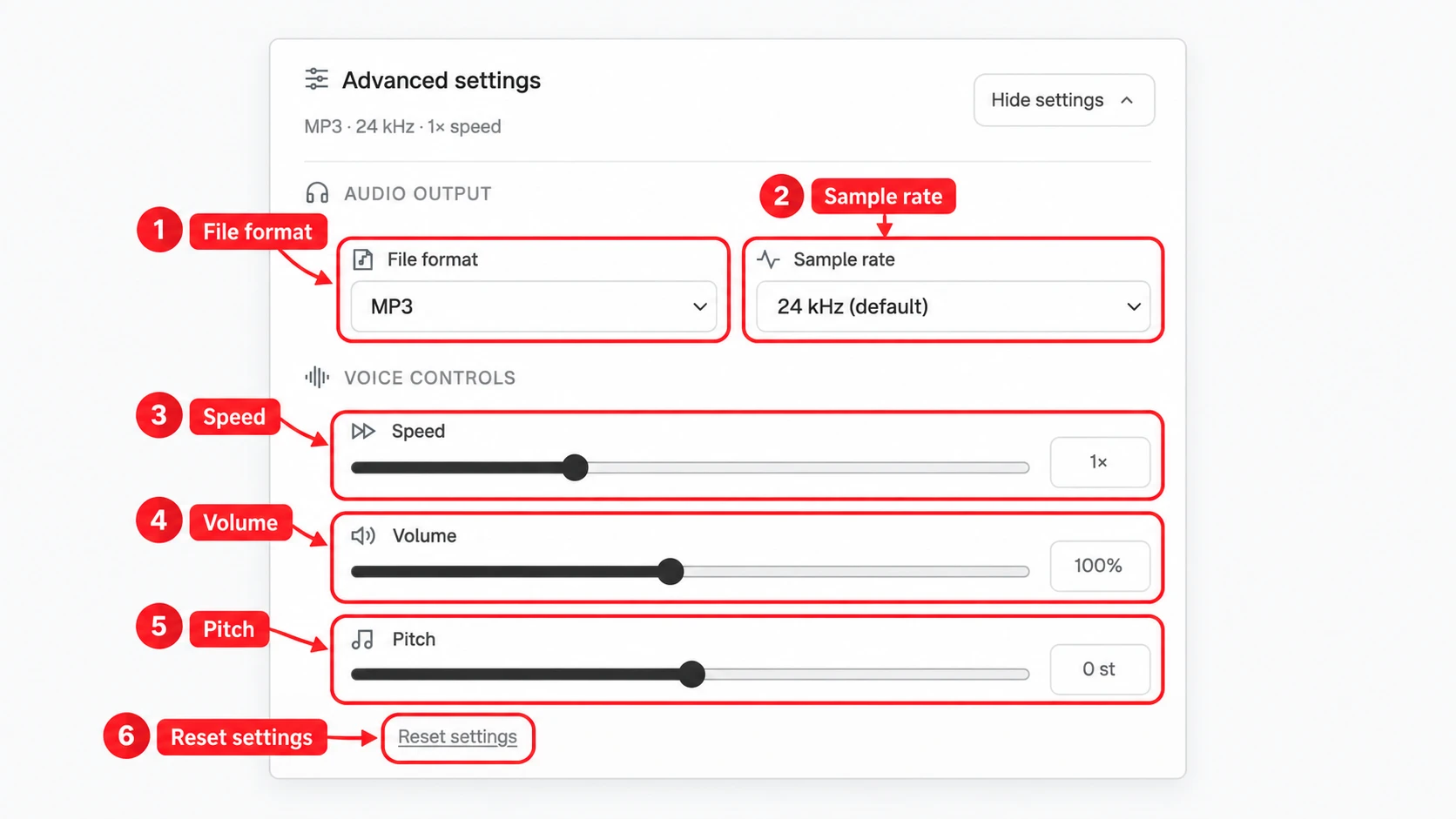
For a first attempt, keep the default settings. Open Show settings only if you need a different output format, sample rate, or voice adjustment. These controls change the request; they do not replace a clear prompt.
- Under Audio output, File format defaults to MP3. This is a convenient starting point for listening and sharing. The other output options are WAV, PCM, and Opus.
- Leave Sample rate at its default of 24 kHz unless your editing workflow needs another available rate. The selector offers options from 8 kHz through 48 kHz.
- Under Voice controls, Speed changes the requested pace, Volume changes the requested level, and Pitch adjusts the voice in semitones. Start with their defaults and change one control at a time.
- Use Reset settings if you want to return the output and voice controls to their defaults. It does not clear your prompt or switch your reference mode.
Output format and upload format are different settings. PCM is an available output option, but raw PCM reference uploads are not supported. If you are unsure which output to use, leave MP3 selected.
Generate Your AI Audio
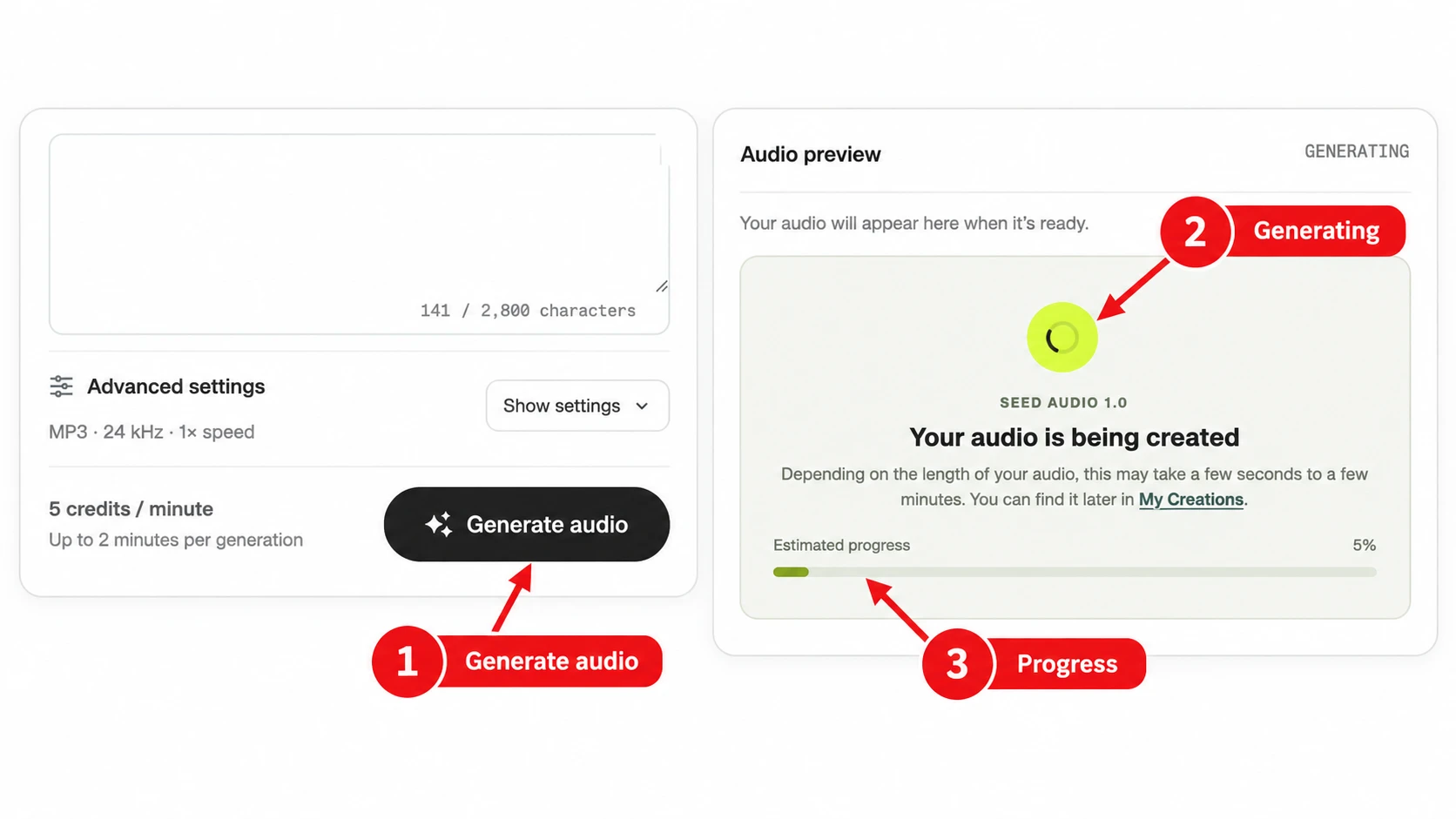
Review the prompt and selected mode, then select Generate audio. If you are not signed in, complete the sign-in dialog. Reference audio and image modes need a successful upload or an added link before you can use them.
- Make sure Describe your audio is not empty and the character counter is within 2,800. Finish any file upload before submitting.
- Select Generate audio once. The right-hand Audio preview panel changes to GENERATING and displays a loading indicator and progress bar.
- Your audio may take anywhere from around 15 seconds to a few minutes to generate, depending on the length and complexity of your scene.
If generation fails, read the error before submitting another request. Check the troubleshooting section below. If you return to the site later, look in My Creations before starting the same scene again.
Preview the Result and Download Audio
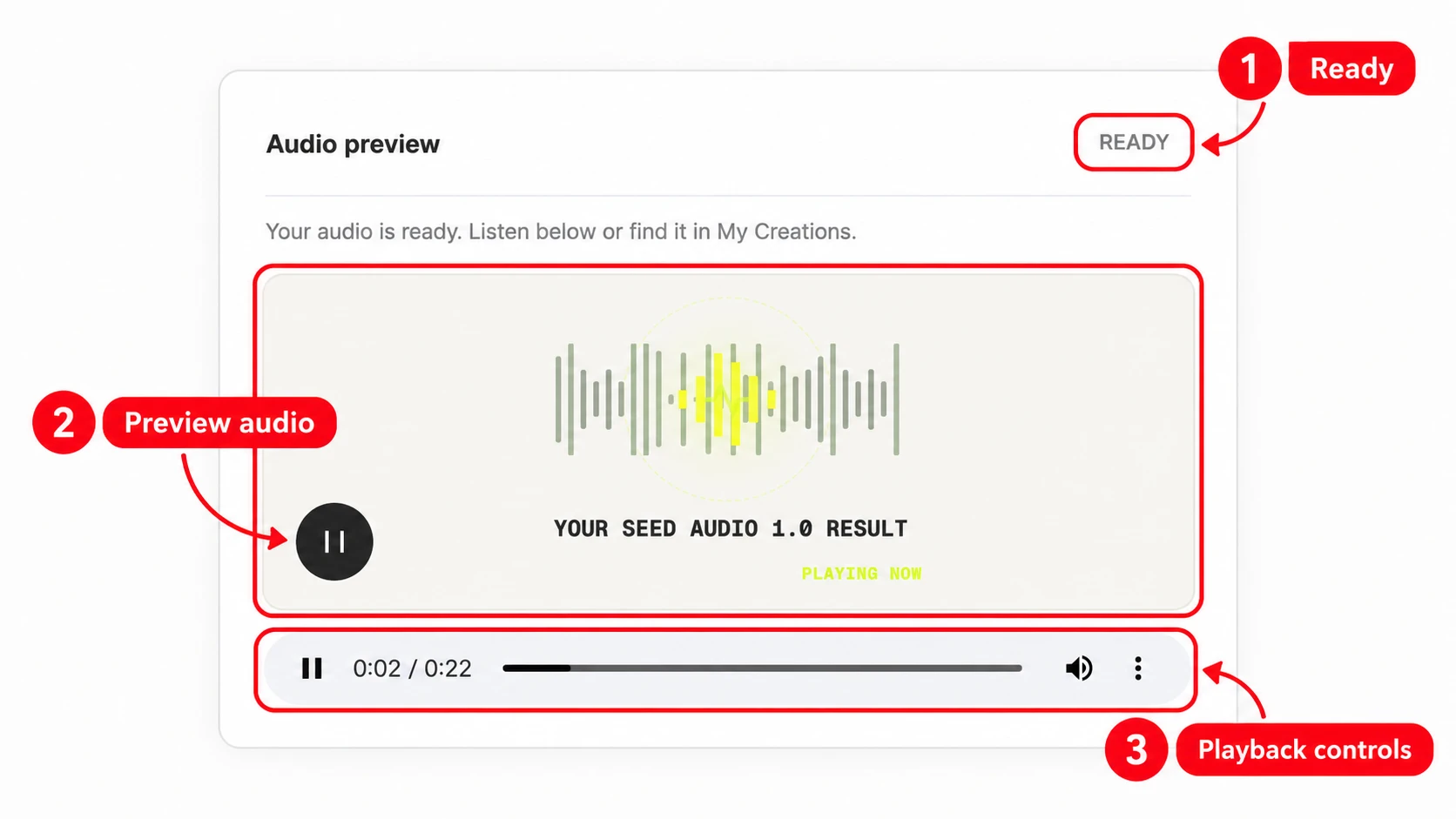
When generation succeeds, Audio preview changes to READY and displays your result. The initial SAMPLE player is a demonstration, so check the status before assuming that a clip is your new generation.
- Press Play in Audio preview. If your browser does not start playback automatically, use the play button or the audio player controls.
- Listen for the words you supplied, the distinction between speakers, the balance of speech and background sound, and the order of important effects.
- Open My Creations and locate the completed item. Use its Download button to save a copy. This is also the place to look if your browser’s preview player does not show a download option.
Keep the downloaded file together with the prompt and settings you used. A request to generate the same scene again can produce a different result; saving a file preserves the version you chose.
Make a Focused Revision
If the first result needs work, identify one audible issue and change the instruction responsible for it. A focused revision makes it easier to understand what helped, instead of changing the voice, music, ambience, and wording all at once.
- For hard-to-hear dialogue, keep the script and ask for quieter music or ambience. For an unclear speaker change, label the speakers and avoid overlapping lines.
- For a crowded scene, remove an unnecessary sound effect or use one main ambience. For timing problems, describe the sequence as first, then, and finally.
- Generate a new version and compare it with the saved one. Each new generation is a separate request; check your credits as you experiment.
You can revise the prompt without re-uploading a reference that is already present. Before generating, confirm that the intended mode is still selected, especially if you switched between Prompt only and a reference mode.
A First Text-to-Audio Prompt to Try
Select Prompt only, copy the prompt below, and paste it into Describe your audio. Keep the default settings. This example gives you one speaker, a quiet setting, and one sound cue to evaluate.
Create an English audio scene in a quiet café. A friendly barista says, “Your coffee is ready. Take your time, and enjoy the morning.” Use a warm, conversational voice with gentle room ambience and a cup being placed on a table after the line. Keep the background quieter than the speech. Do not add music or additional dialogue.
Listen for the exact sentence, a voice that remains above the background, and the cup sound after the line. For other use cases, explore the audio examples and reusable prompts.
Try this prompt in the generatorTroubleshooting Your First Audio Generation
If a request fails or a result sounds wrong, match the problem to the next useful check.
- Generate audio is unavailable
- Enter a nonempty prompt, stay within 2,800 characters, and wait for any reference upload to finish. In audio or image mode, make sure the required reference has been added.
- A reference upload is rejected
- Check the file’s format, size, and audio duration. An Ogg file must contain Opus audio. Renaming a file extension does not convert the file.
- Sign-in or credit errors appear
- Sign in again if the session has expired. Check the balance shown in your account, then review pricing if you need more credits. Follow the actual error message rather than repeatedly resubmitting.
- The preview is silent or does not start
- Press Play manually and check the player and device volume. Confirm that the panel shows READY for your result. If the result itself is silent, review the prompt and try a simpler scene.
- The request takes longer than expected
- The progress bar is an estimate. Look for an error message and check My Creations for a completed result before submitting the same request again.
For a result that plays but needs clearer direction, use the prompt guide. For repeatable comparisons, keep a record of your prompt, selected voice or reference, settings, and result.
Seed Audio Beginner FAQ
Can I use Seed Audio 2.0 on this website now?
Seed Audio 2.0 is marked Coming soon in the model selector. The live workspace currently uses Seed Audio 1.0. You can follow this guide with the available model and check the selector for future availability.
How do I generate AI audio from text without a voice reference?
Select Prompt only under Voice & references, enter your scene in Describe your audio, and select Generate audio after signing in. This mode sends no selected voice, reference audio, or reference image.
How long can my Seed Audio prompt be?
The description supports up to 2,800 characters. The counter inside the input shows your current usage. If a prompt is too long, shorten repeated instructions and keep the details that change what the listener hears.
Can I use a voice, audio reference, and image reference together?
No. Select one mode: Prompt only, Voice library, Reference audio, or Reference image. Only the active mode is used for a generation. Choosing a library voice does not combine it with a saved audio or image reference.
What reference files can I upload?
Reference audio supports up to 3 clips, each no longer than 30 seconds and no larger than 10 MB. Use WAV, MP3, or Ogg Opus. Reference image supports 1 JPEG, PNG, or WebP image up to 10 MB. Raw PCM reference uploads are not supported.
How long does AI audio generation take?
Processing time varies with the request and service availability. The progress bar uses a two-minute estimate and can wait at 99% until the result returns. Check for an error message or look in My Creations rather than treating the progress percentage as a processing guarantee.
Where can I download my generated audio?
Open My Creations, find the completed generation, and select Download. You can first listen in Audio preview. A browser’s native audio player may also offer download controls, but the My Creations Download button is the explicit download action in this workflow.
What should I change if the result is not what I wanted?
Change one thing at a time: the script, voice direction, background level, or event order. Keep the rest of the prompt stable, generate a new version, and compare the two. Clear, audible instructions are easier to evaluate than broad requests for better quality.
Put Your First Scene Into Words
Choose Prompt only, describe one scene, and listen before changing the settings. You can return to this guide as you try voices and references.
Open audio generator Or browse the voice library